Machine Learning with FITS
Training deep learning models directly on astronomical FITS files with native PyTorch datasets, astronomical preprocessing transforms, and high-throughput multi-worker loaders.
For full API signatures, see the Data Module Reference and Transforms Reference.
Why Train Directly on FITS?
Traditional computer vision pipelines often convert astronomical images into 8-bit PNGs or JPEGs before training. For scientific astronomy and astrophysics, training directly on raw FITS tensors provides crucial advantages:
- Full Dynamic Range: Preserves 16-bit and 32-bit floating-point dynamic ranges (from faint \(28^{\text{th}}\) magnitude diffuse sky emissions to bright saturated stars) rather than clipping into \([0, 255]\).
- True Sky Noise Statistics: Retains Gaussian and Poisson background noise profiles, including negative sky-subtracted pixel counts essential for unbiased flux measurement.
- Multi-Band & Multi-Channel Stacks: Seamlessly handles arbitrary filter combinations (\(u, g, r, i, z, Y, J, H, K\), narrowband emission lines, variance maps, and bitmasks) as multi-channel \([C, H, W]\) tensors.
- Zero Intermediate Disk Footprint: Eliminates the need to export terabytes of PNG derivatives before training.
Case Study 1: Galaxy Morphology Classification (Galaxy Zoo + Legacy Survey)
Train a convolutional neural network on real astronomical survey data: Galaxy Zoo 1 morphology labels matched with multi-band FITS cutouts from the DESI Legacy Imaging Surveys.
| Step | Source Data & Purpose |
|---|---|
| Catalog Labels | Galaxy Zoo 1 DR table2 (RA, DEC, SPIRAL, ELLIPTICAL, UNCERTAIN) |
| Image Cutouts | DESI Legacy Survey fits-cutout (\(g, r, z\) bands, \(64 \times 64\) pixels) |
# Fetch sample Galaxy Zoo catalog and download Legacy Survey cutouts
bash scripts/fetch_example_samples.sh
python examples/example_ml_galaxyzoo_legacy.py
1. Preprocessing Pipeline & Dataset Setup
import torch
import torchfits
from torchfits.data import FitsImageDataset, make_loader
from torchfits.transforms import (
    ArcsinhStretch,
    BackgroundSubtract,
    Compose,
    ZScaleNormalize,
)


# NanToZero is example-local: torchfits ships no such transform.
class NanToZero:
    def __call__(self, x):
        import torch

        return torch.nan_to_num(x, nan=0.0)


# 1. Define astronomical preprocessing pipeline
transform = Compose(
    [
        NanToZero(),  # Replace off-footprint survey boundary NaNs
        BackgroundSubtract(),  # Estimate and subtract local sky background
        ArcsinhStretch(a=0.1),  # Reveal faint spiral arm features
        ZScaleNormalize(),  # Map pixel dynamic range to standard normal scale
    ]
)

# 2. Build Dataset over downloaded survey cutouts
dataset = FitsImageDataset(
    file_paths,
    hdu=0,
    labels=target_labels,  # 0: Spiral, 1: Elliptical
    transform=transform,
)

# 3. Create high-throughput multi-worker DataLoader
loader = make_loader(
    dataset,
    batch_size=32,
    shuffle=True,
    num_workers=4,
    pin_memory=True,
)
2. PyTorch Training Loop
# Simple Convolutional Classifier for 64x64 galaxy stamps
class GalaxyClassifier(torch.nn.Module):
    def __init__(self):
        super().__init__()
        self.features = torch.nn.Sequential(
            torch.nn.Conv2d(3, 32, kernel_size=3, padding=1),
            torch.nn.ReLU(),
            torch.nn.MaxPool2d(2),
            torch.nn.Conv2d(32, 64, kernel_size=3, padding=1),
            torch.nn.ReLU(),
            torch.nn.AdaptiveAvgPool2d((4, 4)),
        )
        self.classifier = torch.nn.Linear(64 * 4 * 4, 2)

    def forward(self, x):
        return self.classifier(self.features(x).flatten(1))


model = GalaxyClassifier().cuda()
optimizer = torch.optim.AdamW(model.parameters(), lr=1e-3)
criterion = torch.nn.CrossEntropyLoss()

# Training epoch
model.train()
for batch_images, batch_labels in loader:
    images = batch_images.cuda()
    labels = batch_labels.cuda()

    optimizer.zero_grad()
    outputs = model(images)
    loss = criterion(outputs, labels)
    loss.backward()
    optimizer.step()
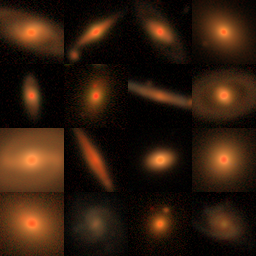
Corresponding script: example_ml_galaxyzoo_legacy.py.
Case Study 2: Conservative MegaCam Denoising
Train a compact U-Net on real CFHT MegaCam darks, test it on a separate dark exposure, and transfer it conservatively to science windows. The science path repairs only isolated sharp positive pixels, so it does not overwrite stars and galaxies with the blank-field prediction.
bash scripts/fetch_cfht_megacam_sample.sh
bash scripts/fetch_cfht_calib_frames.sh
python examples/example_megacam_cr_denoise.py \\
  --mode dark \\
  --compare-astroscrappy
The final dark exposure is reserved as a real test-set frame. The output reports
held-out-dark RMS and CR-like suppression, science source/background
preservation diagnostics, and—when Astro-SCRAPPY is installed—the same
measurements for a classical baseline. Astro-SCRAPPY is optional and is not a
torchfits dependency.
The generated gallery is an artifact-focused 512x512 crop selected for its CR-like pixel count, not a claim that the scene is a stellar cluster. Display panels use percentile stretches, while the Markdown and JSON reports contain the quantitative diagnostics. A “CR removed” percentage refers to pixels that were flagged by the before-image heuristic and are no longer flagged by that same heuristic after cleaning; it is not supervised detection accuracy.
For the implementation rationale, limitations, output files, and full end-to-end walkthrough, see the Denoise Pipeline Case Study.
Corresponding script: example_megacam_cr_denoise.py.
Case Study 3: Survey Mosaic Cutout Pipelines (CFHT MegaPipe)
Extracting thousands of small postage stamps from multi-gigabyte survey mosaics (e.g. CFHTLS D1 IQ MegaPipe stacks: \(\sim 20{,}000 \times 21{,}000\) pixels, uncompressed float32, \(\sim 1.74\text{ GB/band}\)).
# Fetch CFHT MegaPipe survey mosaic
bash scripts/fetch_cfht_megapipe_sample.sh
python examples/example_megapipe_cutout_collage.py
Benchmarking Cutout Performance
torchfits.open_subset_reader maps the uncompressed data segment once and
performs row-level slicing and endian swapping into PyTorch tensors, so a
training loop does not reopen the mosaic on every stamp. Time a given mosaic
on your host with examples/example_megapipe_cutout_collage.py; published
MegaCam cutout CSVs under docs/assets/bench/ are 40 Rice CCD stamps, not
this 1.74 GB stack.
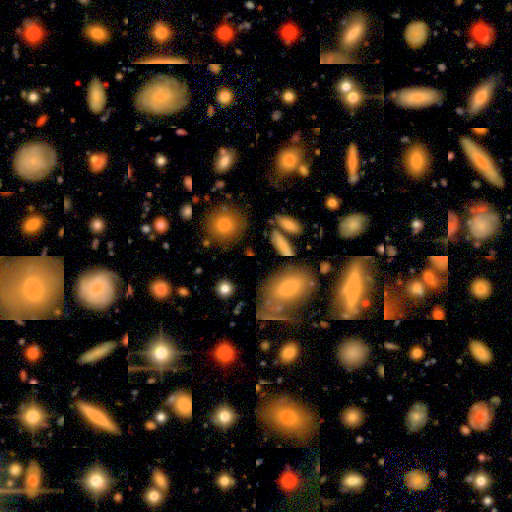
Corresponding script: example_megapipe_cutout_collage.py.
Dataset Selection Guide
The torchfits.data module provides specialized PyTorch Dataset implementations tailored for astronomical data structures:
| Dataset Class | Input Source | Primary Use Case | Output Item Shape |
|---|---|---|---|
FitsImageDataset |
File paths or glob pattern ("*.fits") |
2D/3D images, multi-band stacks, supervised vision models | (tensor, label) |
FitsCutoutDataset |
Mosaic path + list of coordinate bounding boxes | On-the-fly stamp extraction from large survey images | (cutout_tensor, label) |
FitsCubeDataset |
3D datacubes (radio/IFU/spectral) | Spectral line classification, velocity channel modeling | (slice_tensor, label) |
FitsSpectrumDataset |
1D FITS tables or spectral arrays | Stellar/galactic spectral classification (e.g. DESI/SDSS) | (flux_tensor, label) |
FitsTableDataset |
FITS binary/ASCII table | Tabular catalog features in RAM for ML models | (row_dict, label) |
FitsTableIterableDataset |
Massive multi-million row table | Out-of-core streaming iteration without loading to RAM | row_dict |
FitsImageIterableDataset |
Sharded list of 100k+ files | Distributed training across cluster filesystems | (tensor, label) |
DataLoader Best Practices: make_loader vs DataLoader
torchfits.data.make_loader is a tuned factory that wraps PyTorch's native DataLoader with astronomical defaults:
from torchfits.data import FitsImageDataset, make_loader

dataset = FitsImageDataset("data/survey/*.fits", hdu=0)

# Tuned high-throughput loader
loader = make_loader(
    dataset,
    batch_size=64,
    shuffle=True,
    num_workers=4,
    pin_memory=True,  # Accelerate host-to-GPU memory copies
    persistent_workers=True,  # Prevent re-spawning workers between epochs
    optimize_cache=True,  # Warm system page caches across worker pool
)
| Feature | Standard torch.utils.data.DataLoader |
torchfits.data.make_loader |
|---|---|---|
| Multi-worker FITS Collation | Requires custom collate_fn |
Built-in fits_collate_fn handles tensors & dicts |
| Worker Cache Warmup | Manual implementation | Automatic with optimize_cache=True |
| Remote HTTP URL Handling | Fails or downloads synchronously | Prefetches remote URL batches asynchronously |
| Memory Pinning | pin_memory=False by default |
Enabled by default for CUDA environments |
Related Example Scripts
| Script | Topic |
|---|---|
example_ml_galaxyzoo_legacy.py |
End-to-end Galaxy Zoo 1 CNN morphology classification |
example_megacam_cr_denoise.py |
FITS-native Noise2Noise calibration, held-out dark test, and conservative science CR repair |
example_megapipe_cutout_collage.py |
High-throughput survey mosaic cutouts and Lupton RGB collage |
example_image_dataset.py |
Minimal FitsImageDataset + make_loader pipeline |
example_data_catalogs.py |
Tabular catalog and cutout dataset integration |
example_custom_transform.py |
Custom FITSTransform data augmentations |
example_make_loader_vs_dataloader.py |
Performance benchmark comparing make_loader vs DataLoader |